RPA or API Integration for Procurement Automation?
A procurement-focused decision framework for choosing APIs, UI-driven RPA, or a hybrid design based on access, stability, cost, and recovery.

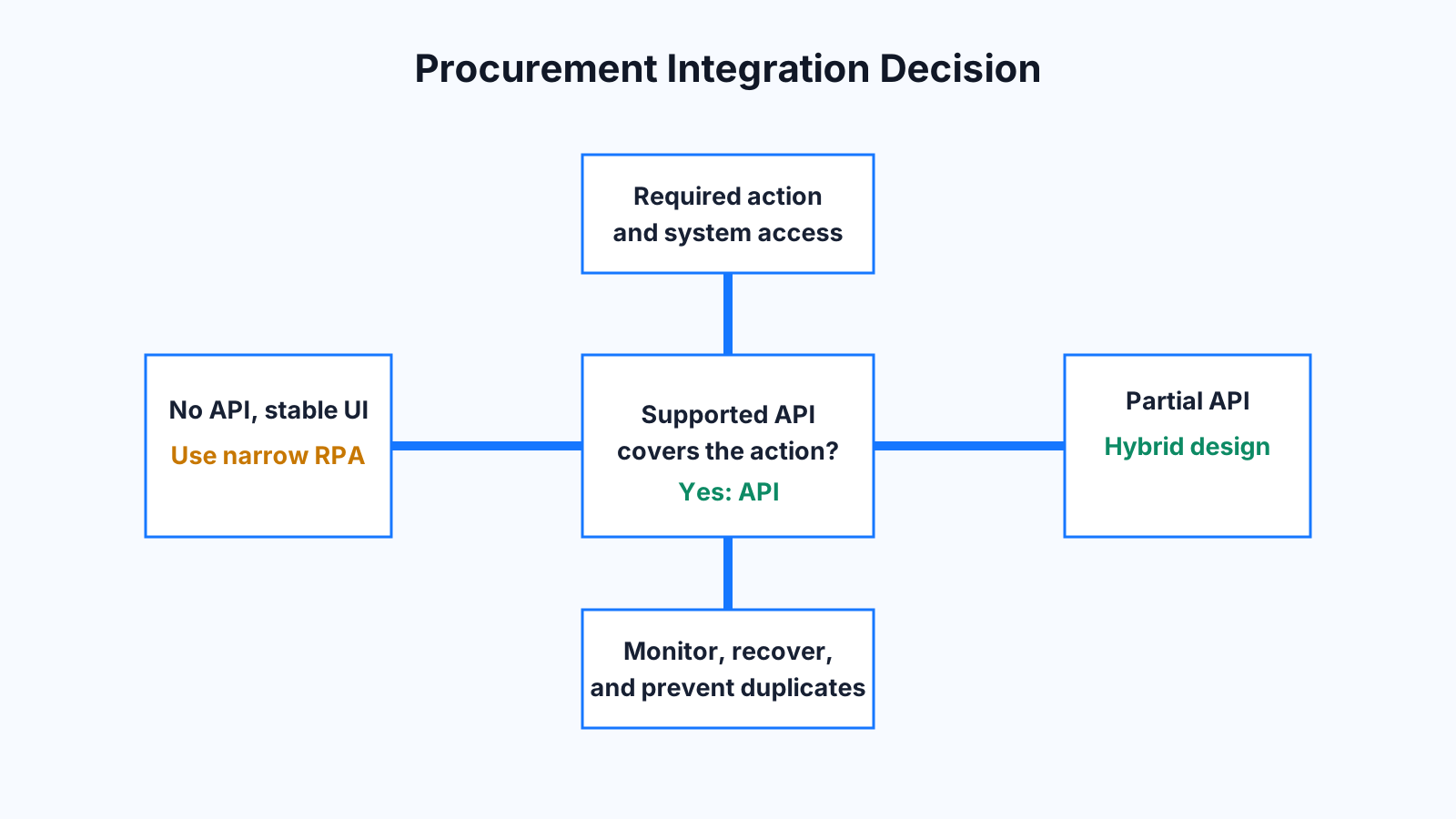
Use a supported API for procurement automation when the systems expose the records and actions you need. Use RPA when a required legacy system has no suitable API and the user interface is stable enough to automate. Choose a hybrid design when APIs can handle the reliable core while a desktop flow covers the remaining screen-only step.
The choice affects maintenance, permissions, failure recovery, and the true cost of the workflow. A quick build is not always the cheaper system to operate. Before comparing tools, estimate the current process and expected benefit with the EXOPAI automation ROI calculator, then include ongoing support in the decision.
When an API is the stronger foundation
An API exchanges structured data directly with an application. For procurement, that might mean creating requisitions, reading supplier records, checking PO status, or posting an approved change. APIs usually provide clearer authentication, consistent field definitions, predictable responses, and error codes that a workflow can handle.
Prefer an API when it is officially supported, covers the needed operation, and offers acceptable limits and service commitments. Check whether it supports the exact business event, not merely read access. Also review pagination, rate limits, versioning, webhooks, sandbox availability, and audit logs. An endpoint that cannot submit an approval or update a line item may still leave the critical step unfinished.
API access should use a dedicated service identity with the smallest practical permissions. Secrets belong in a managed credential store, not inside the workflow. The integration should log request identifiers and use idempotency controls where duplicate actions would create financial or operational risk.
When RPA is a practical bridge
RPA controls the same desktop or browser interface a person uses. It can be useful when procurement depends on an older application, supplier portal, or virtual desktop that exposes no suitable integration. The tradeoff is sensitivity to interface changes, pop-ups, session timeouts, screen resolution, and machine availability.
Microsoft’s desktop automation guidance explains that flows interact with applications through captured UI elements. That makes selector quality and interface stability central to reliability. See the official guidance on desktop automation with UI elements. For unattended execution, Microsoft also requires appropriate machine setup, access, and licensing, all of which belong in the operating-cost estimate.
Use a decision checklist
Start with access. Does a supported API expose the data and action? If yes, assess its security model, limits, and version stability. If no, determine whether the screen flow is consistent, whether UI automation is permitted, and whether a machine can run it without blocking staff.
Then compare change risk. APIs can change versions, but supported contracts tend to be explicit. RPA may break when a button moves or a dialog appears. Compare recovery as well. An API error often returns a code and request ID. A desktop flow may need screenshots, step logs, and a replay queue to explain where it stopped.
Include licensing, development, monitoring, credentials, infrastructure, testing, and support. Microsoft notes that unattended desktop flows require available machines and appropriate process capacity. Its documentation on running unattended desktop flows is a useful checklist for the operational requirements.
A hybrid procurement example
Imagine a company that receives approved purchase requests in a modern procurement platform but must enter final orders into a legacy desktop system. The API can retrieve the approved request, validate supplier and budget data, and create a work item. An unattended desktop flow enters the approved fields into the legacy application. The API-based service then records the result and alerts an operator if the desktop step fails.
This is a labeled hypothetical scenario, but it shows where the boundary belongs. Structured validation and orchestration stay in the more observable API layer. RPA performs only the screen interaction that cannot be replaced. If the legacy system later adds a supported write API, that narrow desktop step can be removed without rebuilding the whole process.
Design recovery before launch
Both options need a clear recovery path. Store the last confirmed state, use unique transaction identifiers, and prevent a retry from creating a duplicate PO. Put failed cases in a visible queue with the input, error, owner, and next action. Monitor API latency and authorization failures. For RPA, monitor machine health, session state, selector failures, and application changes.
Run a representative pilot that includes exceptions, not just the ideal path. Track completion rate, manual intervention, recovery time, and maintenance effort. Those figures provide a better architecture signal than the time required to build the first demonstration.
Conclusion
For procurement automation, a supported API is usually the best long-term foundation. RPA remains useful for stable, screen-only systems, especially when it is kept narrow and monitored. A hybrid workflow often gives teams a practical route out of legacy constraints. EXOPAI can help you map the process, test the available interfaces, and choose an approach based on operating cost and recoverability rather than tool preference.


